HPE Aruba J8177E Compatible 1G SFP SGMII Transceiver Module
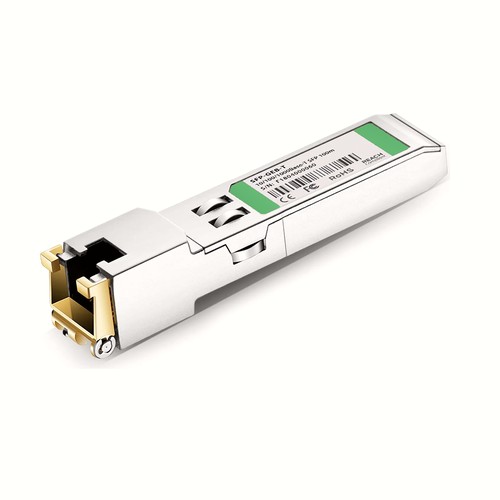
The J8177E compatible module serves equipment requiring a 1G SFP SGMII interface with the listed wavelength plan optics and a 100m rating. Connection is through RJ-45. Product data, application guidance and factory verification are presented together to support network teams verify host acceptance as well as physical interface fit.
OEM Part Number: J8177EHT Part Number: SFP-GEB-T
Product Highlights
- Compatible alternative to HPE Aruba J8177E
- 1G connectivity at 1000Mbps
- Specified reach: 100m
- RJ-45 / Cat 6/Cat 6a interface
- Operating temperature: 0 to 70°C (32 to 158°F)
- Factory compatibility verification and electrical performance testing before shipment
Specifications
| HPE Aruba Compatible | J8177E |
|---|---|
| Manufacturer | HT |
| HT Part Number | SFP-GEB-T |
| Form Factor | SFP SGMII |
| Max. Data Rate | 1000Mbps |
| Media | Cat 6/Cat 6a |
| Max. Cable Distance | 100m |
| Connector | RJ-45 |
| RX_LOS | NO |
| DOM Support | No |
| Commercial Temperature Range | 0 to 70°C (32 to 158°F) |
| Protocols | MSA Compliant, IEEE STD 802.3 |
Applications and Optical Link Design
This copper transceiver is intended for short equipment links over the twisted-pair cabling category stated in the specifications. Typical uses include switch-to-server, switch-to-switch and rack-level connections where an RJ-45 interface is preferred over fiber. Use the required cable category, observe the rated distance and confirm that the host supports the module’s speed, power consumption and electrical operating modes.
Before deployment, check the host port type, supported data rate and firmware requirements. The 1G interface configuration must match the remote equipment; sharing a SFP SGMII housing alone does not make two transceiver types interoperable.
For this copper interface, use the stated cable category and keep the channel within 100m. Patch-cord construction, connector quality and auto-negotiation can affect the result. Verify the negotiated speed and diagnostics at both ends rather than assuming every RJ-45 port behaves identically.
HPE Aruba Compatibility and Factory Testing
Compatibility testing for J8177E combines identification with a live link and available transmit, receive and alarm information. Connector condition is inspected separately. Equipment model, hardware revision and software release can be reviewed before dispatch where platform behavior is uncertain.
Optical Acceptance, Diagnostics and Handling
Use the electrical and optical limits in the specification table as the acceptance reference for this model. During commissioning, record the host diagnostic readings after the link has stabilized and compare them with those limits. DOM values are useful operational indicators, but they do not replace calibrated optical measurements when a link is marginal. Investigate unexpected loss through connector inspection, cleaning and a channel measurement before replacing the module. Before every insertion, keep dust caps in place until the patch lead is ready, avoid touching the optical end face and use an appropriate inspection and cleaning procedure. Do not look into an active optical interface.
Interoperability and Host Configuration
Check three layers before deployment: host acceptance of the module identity, port support for the stated rate, and a matching optical standard at the remote interface. For breakout operation, confirm lane configuration too. Similar-looking cages can behave differently across speeds and firmware settings. For this model, the principal parameters are data rate 1000Mbps, rated reach 100m.
Ordering Information
When ordering, specify J8177E, SFP-GEB-T, quantity and intended host platform. Project labels can repeat these details for receiving and asset records. Neutral labels, customer packaging and project-specific compatibility review are available on request.
Shipping and Lead Time
Standard configurations normally ship within one to three working days, with production lead times confirmed for larger quantities. International courier, air freight and sea freight are available; customer courier accounts and nominated forwarders are accepted.
Quality Assurance and Packaging
Before packing, the module receives interface inspection, identification and link checks. Protective packaging avoids pressure on the connector and latch. Customer references, rack groups and project packing lists can be added for volume orders.
Frequently Asked Questions
Is this an original HPE Aruba transceiver?
No. It is an HT-manufactured compatible alternative for equipment that specifies J8177E, not an original HPE Aruba-branded module.
Which copper cable and connector are required?
Use RJ-45 with the specified category of Cat 6/Cat 6a. The rated reach is 100m, subject to cable category, installation quality and host support.
Can it be used at a different speed or over another cable category?
Only within the multi-rate and cabling capabilities stated in the specifications and supported by the host. Confirm the required cable category, distance and auto-negotiation behavior before installation.
Fiber Optic Cables
Fiber Transceivers
Get a quick quote
 Lisa Zhou
 Steve Yan
 Flora Luo
 Stone Wang
 Allen Hu
About us
China Factory:No 168 Golden Ground Industrial Area;Philippines Address:Makati City,Metro Manila, Philippines